Technical support
iKey Troubleshooting Guide
Use this guide when iKEY Premier passive entry, locking, alarm, remote start, or push-button ignition behaves differently from the installed configuration. Start with the vehicle safely parked, the transmission in Park or Neutral, and the parking brake applied. Keep every programmed fob available so you can compare behavior and determine whether the issue follows one fob or the vehicle.
Passive-entry range is affected by fob battery condition, antenna placement, metal shielding, and nearby radio interference. A symptom at one door or one location is not automatically a failed control module. Confirm stable vehicle voltage, module power and ground, antenna connections, brake input, and lock outputs before changing programming. Vehicles with factory immobilizers may also require a compatible bypass or data module.
Start with these checks
- Test every fob and replace weak fob batteries before changing system programming.
- Confirm the vehicle battery, module power, ground, fuses, and antenna connectors.
- Compare passive-entry operation at each door and inspect antenna placement or shielding.
- Verify brake, ignition, starter, lock, and trunk signals against the installed configuration.
- Retest passive entry and the normal start sequence after each corrected connection.
Common questions
Why does passive entry work only at short range?
A weak fob battery, antenna placement, metal shielding, or local interference can reduce range. Compare fobs and inspect antenna routing first.
Why will iKEY unlock the vehicle but not start it?
Unlock and start use different inputs and outputs. Verify fob authorization, brake input, ignition and starter wiring, and any required immobilizer bypass.
Interactive Troubleshooting Guide
Follow the troubleshooting steps for the selected system
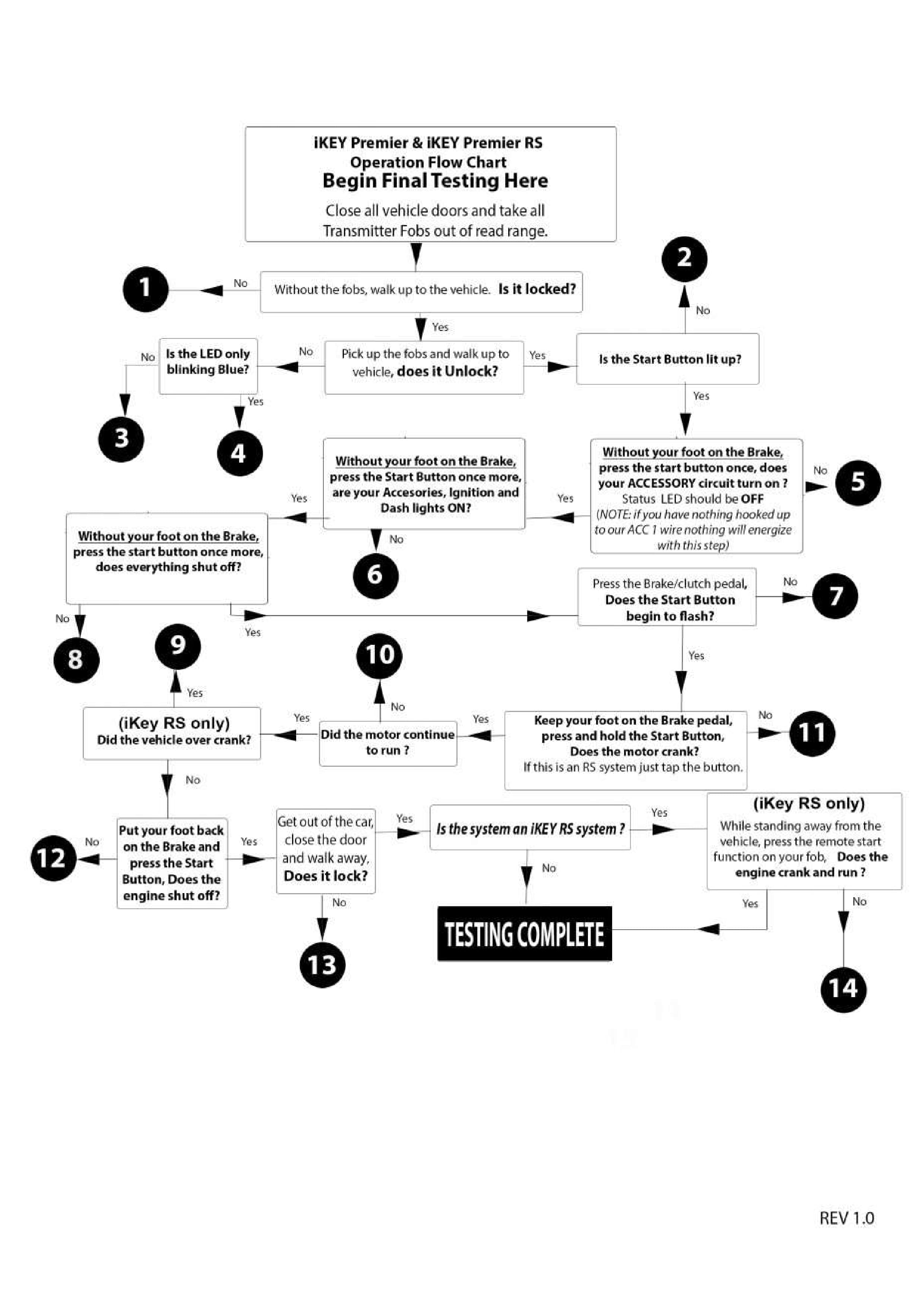
iKey Flow Chart
Step 1