Technical support
PBS Troubleshooting Guide
Use this guide when a PBS-I or PBS-II system does not recognize the RFID fob, does not move through ACC and IGN correctly, or will not crank the engine. Begin with the vehicle in a safe, ventilated location, the transmission in Park or Neutral, and the parking brake applied. Troubleshooting should confirm power and ground before any module, button, fob, or bypass component is replaced.
A weak vehicle battery, a poor chassis ground, an open fuse, or a missing brake-input signal can create symptoms that resemble a failed control module. Work through the checks in order and record the voltage or wire state you observe. Do not bypass vehicle safety circuits. If the installation uses a data or immobilizer-bypass module, use its manufacturer instructions alongside the Digital Guard Dawg wiring guide.
Start with these checks
- Confirm the vehicle battery is charged and the main module has constant 12-volt power.
- Inspect the module ground, inline fuses, connectors, and start-button harness for a secure connection.
- Verify the RFID fob is recognized and replace its battery if recognition is intermittent.
- Check the brake, ignition, accessory, and starter inputs against the installation diagram.
- Retest the normal start sequence before changing components or programming settings.
Common questions
Why does the button light up but the vehicle does not crank?
The module may have power while the brake input, starter output, ground, neutral-safety circuit, or bypass module is incomplete. Verify each signal in order.
Should I reprogram the fobs first?
No. Confirm vehicle voltage, module power, ground, fob battery, and harness connections first. Reprogram only when the electrical checks pass.
Interactive Troubleshooting Guide
Follow the troubleshooting steps for the selected system
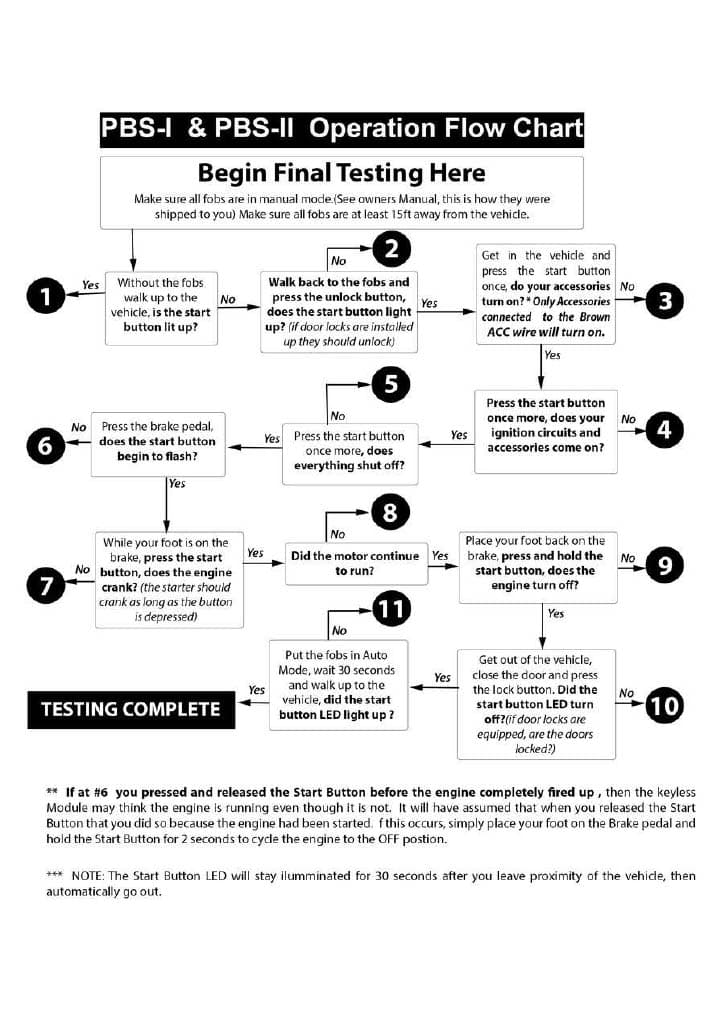
PBS Flow Chart
Step 1