Technical support
PBS-X Troubleshooting Guide
PBS-X adds push-button start to a vehicle that already has a compatible aftermarket alarm or remote-start system. Troubleshooting must therefore separate the PBS-X connections from the host alarm or remote-start behavior. Park safely, apply the parking brake, place the transmission in Park or Neutral, and confirm that the existing system still arms, disarms, and remote-starts as expected before testing PBS-X.
If the host system cannot provide the required status, ignition, brake, or authorization signals, PBS-X may be operating correctly but unable to complete the requested start sequence. Use both wiring diagrams and verify signal polarity with an appropriate meter. Do not probe airbag, CAN, or factory immobilizer circuits without the vehicle-specific instructions. Correct power, ground, and host-system faults before changing PBS-X programming.
Start with these checks
- Confirm the existing alarm or remote-start system operates normally without PBS-X input.
- Verify PBS-X constant power, ground, fuses, button harness, and all module connectors.
- Check authorization, brake, ignition, accessory, starter, and running-status signals.
- Confirm every connection uses the polarity and timing required by the host system.
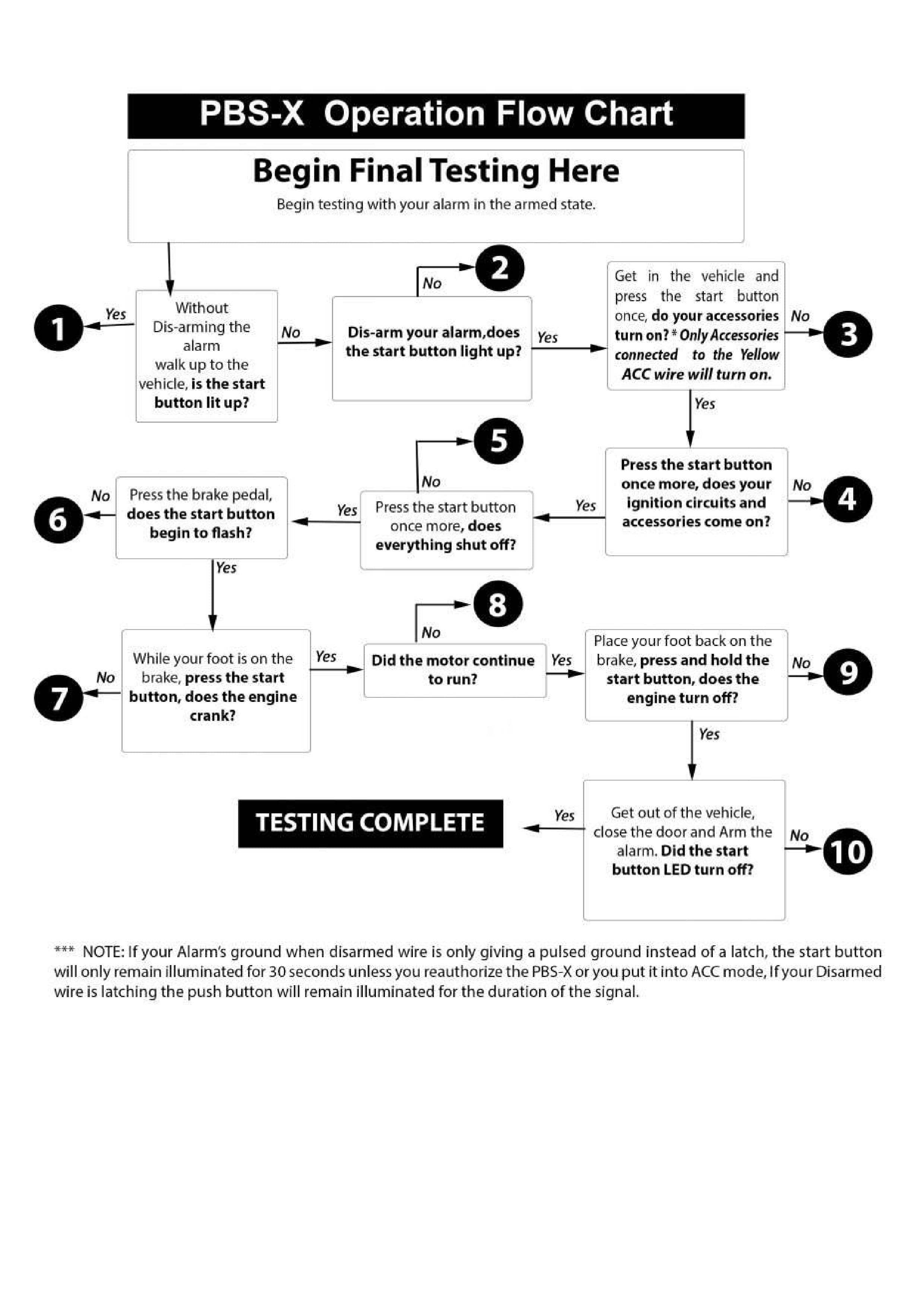
- Retest disarm, button authorization, crank, run, and shutdown as a complete sequence.
Common questions
Can PBS-X replace an alarm or remote-start module?
No. PBS-X is an expansion module and depends on a compatible existing aftermarket alarm or remote-start system.
Why does the host remote start work while the PBS-X button does not?
The button path may be missing authorization, brake, status, or ignition signals even though the host module can start the vehicle independently.
Interactive Troubleshooting Guide
Follow the troubleshooting steps for the selected system
PBS-X Flow Chart
Step 1